Complete Guide to the Nautilus in Minecraft 1.21: Taming and Equipment
- Android: 8,0+🕣 Updated
- CategoryInstructions
![Complete Guide to the Nautilus in Minecraft 1.21: Taming and Equipment]()

The Minecraft 1.21 update, titled «Riders of the Depths», introduced many exciting mechanics to the game, but perhaps the most anticipated addition was the living Nautilus. For a long time, this mob existed only as an item — a shell, but now the game’s oceans have truly come to life. In this guide, we’ll explore how to find, tame, and equip this unique creature with armor.
Why did the developers change the oceans?
For years, players complained that deep oceans, despite the Aquatic update, remained insufficiently interactive. The nautilus shell was merely loot from drowned mobs, required for crafting the Conduit.
In version 1.21, Mojang decided to address this by turning the Nautilus into a full-fledged mob. This change was driven by the desire to make underwater exploration more accessible and engaging without the immediate need to build complex underwater bases or brew potions. Now, players have a loyal companion capable of changing the tactics of exploring the ocean depths.
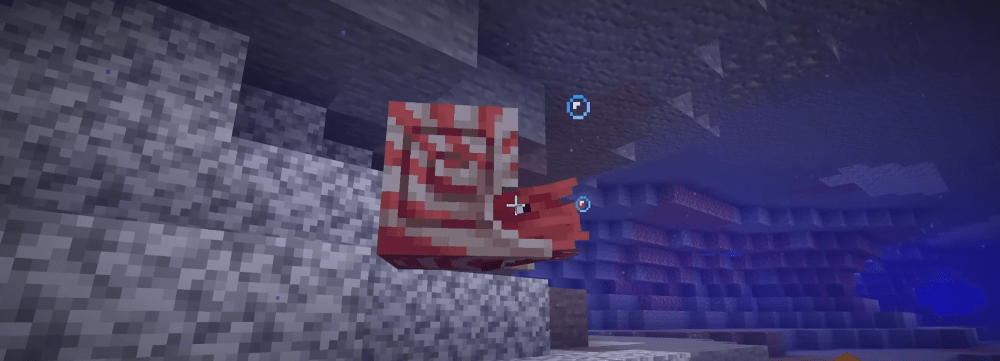
Where does the Nautilus live?
Before thinking about taming, you need to find your target. Nautiluses are deep-sea creatures.
- Biomes: Look for them exclusively in Deep Ocean biomes and their variations (cold, frozen). They rarely come to the surface.
- Behavior: They usually swim alone or in small groups of up to three. Be cautious: zombie nautiluses, which are aggressive towards players, now inhabit these waters as well.
- Visual marker: A living nautilus is much larger than the shell item and has characteristic tentacles that move rhythmically while swimming.
Taming process: step by step
The taming mechanics for the Nautilus differ from the horses or wolves we’re used to. It requires preparation and patience.
Preparing the bait
Nautiluses are predators that feed on small crustaceans. The 1.21 update introduced a new type of bait: Krill Meat. It can be obtained by breaking seagrass blocks in warm oceans or, with a small chance, by fishing with a rod.
Approaching
Swim towards the nautilus slowly. If you swim too fast (using sprint), it will get scared and release an ink cloud, blinding you for a few seconds.
Feeding
Hold the krill meat in your hand. When the nautilus shows interest and swims closer, feed it (Right Click / L2) until hearts appear. Usually, 3 to 6 pieces of meat are required.
Important: After being tamed, the nautilus will not follow you onto land but will faithfully wait for you in the water within the chunk radius.
New equipment system: Armor and Saddle
The most significant innovation — the ability to turn the nautilus into a combat submarine.
- Saddle: A standard saddle fits the nautilus. Once equipped, you gain full control over its movement.
- Nautilus Armor: Unlike horse armor, nautilus armor is crafted from prismarine shards and copper ingots. This highlights the update’s connection to ocean monuments.
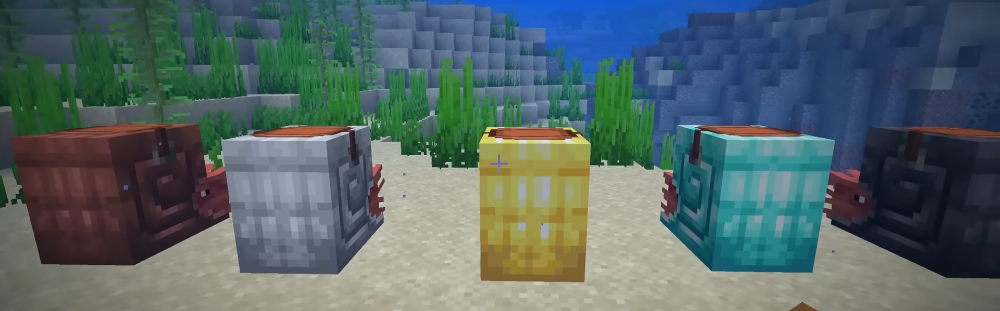
How to equip:
To open the nautilus inventory, hold Shift and right-click on it (or the corresponding button on the controller). You’ll see a slot for the saddle and a slot for the armor.
Impact on gameplay
A tamed nautilus drastically changes survival:
- Oxygen support: While riding the nautilus, the player does not lose oxygen. It works similarly to the Conduit effect but is mobile.
- Dash: The nautilus has a dash ability (jump button underwater), allowing it to instantly dodge drowned tridents.
- Defense: With armor equipped, the nautilus becomes a true tank, capable of withstanding a guardian’s explosion in an Ocean Monument.
Conclusion
The introduction of the living nautilus in Minecraft 1.21 — is a huge step forward for fans of marine adventures. Now, exploring shipwrecks and ruins is not only safer but also more immersive.
Have you found your first nautilus yet? Which armor do you find more effective for underwater raids — the new one for the pet or enchanted diamond armor for yourself? Share your experience in the comments.
- publishedMceadmin
(Google Ads) Privacy Policy and Terms of Use


